解決 Windows RAM disk 上 rustfmt could not canonicalize path

之前在 Windows 上開發 Rust 的時候,有時為了避免一些專案打包會消耗 SSD 的壽命而把整個專案放在 RAM disk 上,多數人應該都是用「ImDisk」這套,我也是。原本都用得好好的,直到我發現 cargo fmt 的時候會出現 warn: could not canonicalize path 警告,所以又要把程式碼搬回去一般的磁碟上 format 後再 commit:

1
2
3
4
5
6
7
8
9
10
11
12
13
14
15
16
17
18
19
20
21
22
23
24
25
26
27
28
29
30
31
I:\go-to-the-future>cargo fmt
warn: could not canonicalize path I:\go-to-the-future
warn: could not canonicalize path I:\
功能錯誤。 (os error 1)
This utility formats all bin and lib files of the current crate using rustfmt.

Usage: cargo fmt [OPTIONS] [-- <rustfmt_options>...]

Arguments:
[rustfmt_options]... Options passed to rustfmt

Options:
-q, --quiet
No output printed to stdout
-v, --verbose
Use verbose output
--version
Print rustfmt version and exit
-p, --package <package>...
Specify package to format
--manifest-path <manifest-path>
Specify path to Cargo.toml
--message-format <message-format>
Specify message-format: short|json|human
--all
Format all packages, and also their local path-based dependencies
--check
Run rustfmt in check mode
-h, --help
Print help

一開始我很疑惑怎麼會有這種問題,上網爬了下,發現早有 issue:https://github.com/rust-lang/rust/issues/48249

往下研究了一下,好像是 ImDisk 掛載虛擬磁碟機的方式繞過了現代 Windows 作業系統的一些機制,所以即便你可以用,但 Rust API 從 Windows 那邊拿到的資料就是沒有這個磁碟。

那該怎麼辦?一開始我就想說算了,反正這樣用的機會應該不多。沒想到隨著時間過去,我現在 side project 幾乎都在寫 Rust 啊!看來這問題遲早也是得解決才行。

解法

昨天原本想說周末有點時間,於是來研究一下這個問題。後來找到了一個方法:沒辦法解決問題,那就解決提出問題的人既然 ImDisk 無法符合作業系統機制且已經停止維護,那就換一套吧!

從該 issue 中,我運氣很好的找到了其他人推薦的另外一套虛擬磁碟機工具:AIM Toolkit。嘗試了下的確能動,而且支援的功能更多!像是之前如果要開機自動掛一個 RAM disk 還要自己寫批次檔,但 AIM Toolkit 都內建了還有 GUI,點一點就完工了。聽起來是不是很棒,趕快下載來試試吧!
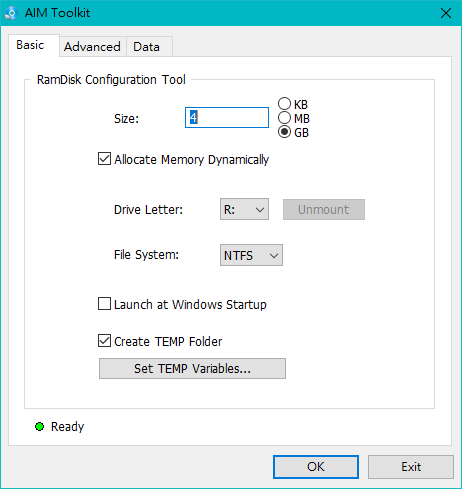
AIM Toolkit

這一款軟體也有香港中文,但不知道誰翻譯的,正體中文指稱的是臺灣在用的,香港的要說繁體中文才對。總之雖然我畫面截圖是英文,但安裝的時候其實就有中文可以選啦,不用擔心。